
 USD
USDHow do I create a product bundle for Shopify?
With just a few clicks, you can quickly create a bundle of multiple products on Shopify and sync them together to your online store as a single listing. For other platforms, you can create bundles of two products and sync them as a single listing.
1.When adding a product template to your integrated online store, you will see a button "Add product" under the variant settings;

2.Click the "Add product" button;
3.Choose another product template you want to bundle together from your list of product templates;

4.Select variants for the second product;

5.Configure variant settings(optional)
If you want to treat different product templates as independent variant types (e.g., styles), you can: Toggle "Use product template as a separate variant", the system will merge identical color names from different product templates into a unified option, providing a better user experience.
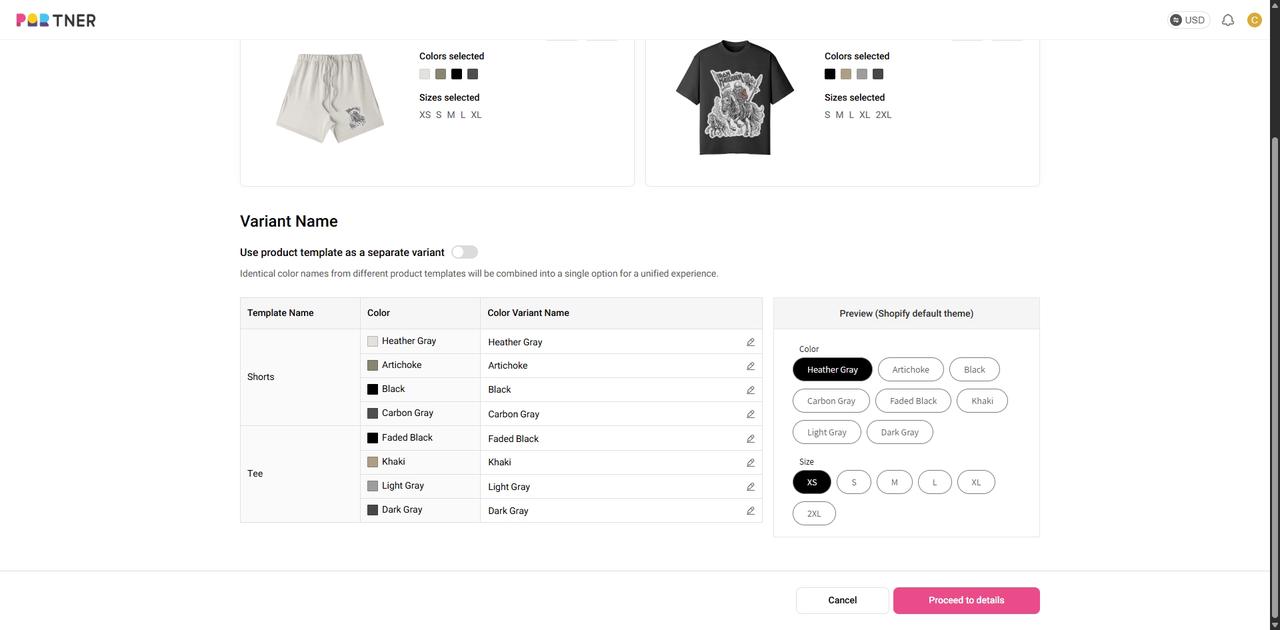
In the pop-up window, name the Template Variant. Click "Save" to save your settings.

6.Select product images and edit the product description for your bundle product page.
7.Link packaging design templates(if needed)
8.Set product prices for each product template, and you're ready to go!