Can I use PODpartner if I’m not selling on an eCommerce platform?
Yes. You can manually make an order by following the steps below.
1. Go to “Product template” and create a new design.
2. Save your design and choose “Create order” in the pop-up window. Then click on “Place an order”.
3. Complete your shipping address and hit the “Order” button.
4. Select a shipping method and proceed to payment. Once your payment goes through, your order is placed successfully and will be sent to production shortly.
If you have already created a product template, you can go to “Product template” > choose a ready-to-use product template from the list > hit "Order" > Click "Place an Order", and follow steps 3 & 4 mentioned above.
Which countries do you ship to?
We can ship our products to almost every country in the world. Please refer to the dropdown list of countries when you’re creating a shipping address.
Can I use PODpartner anywhere in the world?
Yes. Wherever you are located, you can enjoy PODpartner’s print-on-demand & dropshipping services.
Where is PODpartner located?
Our headquarters are situated in Shenzhen, China. Additionally, we operate a branch office and an in-house printing factory in Wuxi, along with several garment manufacturing facilities spread across various Asian countries.
What are PODpartner’s advantages?
✓ 9 years of experience in custom clothing manufacturing
✓ An extensive catalog covering a vast array of trendy clothing styles
✓ 100% premium cotton garments that are never out of stock
✓ A low-margin pricing policy that offers you higher profitability
✓ A smart Design Creator supporting up to 18 print areas per garment (maximum unit size 16” x 21”)
✓ Efficiency-oriented order processing solutions tailored to your needs
✓ An in-house factory where 98% of the orders can be fulfilled within 48 hours
✓ Dazzling end products with a 99% customer satisfaction rate
What is VoteCustom Program & Premium Services?
At PODpartner, we offer two distinct ways to bring unique products to life: the VoteCustom Program (community-driven) and Premium Customization Services (bulk orders). This guide explains the available options, voting rules, and bulk order privileges.
Available Customization Options
Applicable to both VoteCustom items and Premium Services.
We offer a range of premium specifications that can be configured depending on your chosen program.
- Texture (Fabric):
- Brushed Fleece: Soft, warm, and heavyweight.
- French Terry: Breathable, classic loopback texture.
- Post-Processing (Washes & Treatments):
- Basic: Unprocessed.
- Advanced Washes: Snow Wash, Sun Faded, Distressed.
- Hybrid Treatments: Snow Wash + Distressed, Sun Faded + Distressed.
- Color:
- Standard palettes or Custom dyeing (Pantone matching available for Premium orders).
How the VoteCustom Program Works
You Vote. We Build.
The VoteCustom Program allows the community to decide our next product launch. For eligible items, you can cast your vote on the specific texture, post-processing, and color combinations listed above.
Voting Rules & Policy:
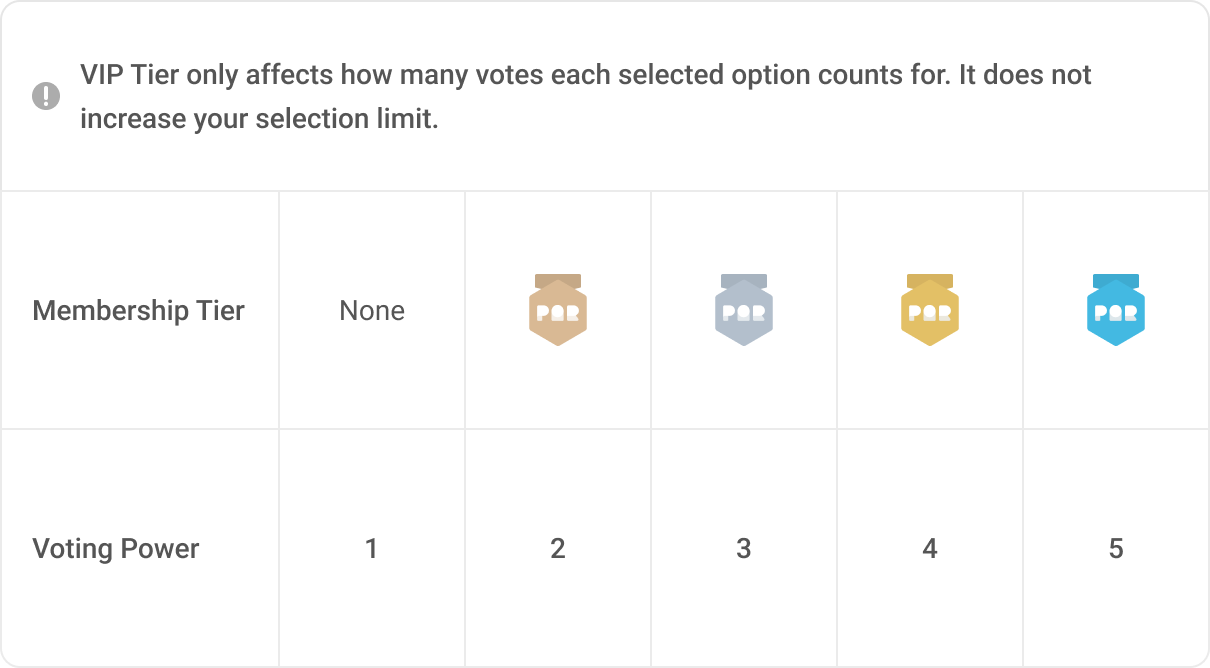
- One Vote Per User: To ensure fairness, each user account is limited to one vote per campaign.
- Weighted Voting: Your influence on the final result depends on your Membership Tier. Higher tiers carry more weight in the final tally.
Premium Customization Services (Bulk Orders)
Unlock full creative control.
If you require specific designs without waiting for a vote, or if you need to stock your brand, our Premium Service offers complete flexibility.
Eligibility:
- Requires a bulk purchase of 200+ pieces.
- Applies to any SPU (style) on our website or styles using the same fabric.
Key Benefits:
- Flexible Configuration: Unlike the voting program, you are not limited to the winning result. Starting with the base model, you can freely select one or more of the customization options (Texture/Wash) above.
- Custom Dyeing: You can request specific Pantone colors. (Minimum 200 pieces per color required).
Need more help?
If you have questions about your membership tier or need a quote for a Premium Bulk Order, please Contact Support.
How much does PODpartner charge for digitization?
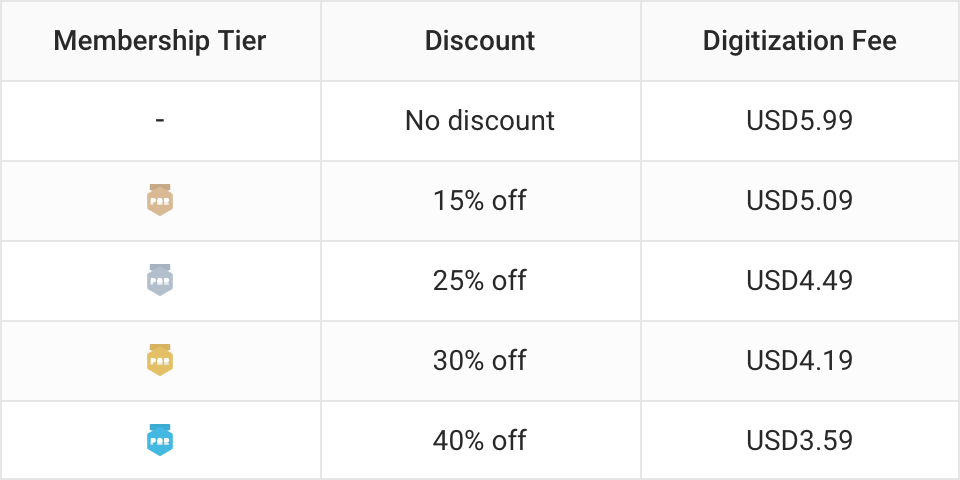
The digitization fee will apply only when you upload an image design for embroidery. Digitization fees start at USD 5.99 per frame (the price is the same for each frame size), with higher membership tiers receiving greater discounts as shown in the table.
Where can I find my digitized files, and can I download them?
You can find all digitized files in the 'Embroidery' section of the File Library in your dashboard. Simply select the file you want to download, and a download button will appear for you to proceed.
Can I scale/resize my digitized embroidery design?
Digitized designs cannot be resized directly. If you upload a DST file, the design size is fixed and cannot be adjusted in our Design Creator. You can only modify the size by adjusting it in the software used to create the DST file, and then re-uploading the updated file.
If you upload an image for us to digitize, and it’s still in the "pending digitization" or "digitizing" status, you can provide feedback for size adjustments once it reaches the "awaiting approval" status.
Be sure to confirm that the design is correct before approving the digitization preview, as the design size cannot be changed after digitization is complete.
How does PODpartner control embroidery quality?
Our quality control process involves two essential stages:
1.Digitization: Our expert digitization team meticulously converts your artwork into embroidery files. Each file undergoes a detailed review before approval. Once digitized, the same file is used for all future orders, ensuring consistent quality across productions.
2.Production: During the production phase, our professionals continuously monitor quality, checking for stitch accuracy and consistency. The final touches include precise thread trimming and the application of a comfort cover backing for both a polished appearance and optimal comfort. Before shipment, every item goes through a final comprehensive inspection to ensure flawless results.

- How it works
- Shipping
- About us
- Blog
- CapabilitiesPersonalizationJumbo DTG
- Help center
 USD
USD