Does your product price include shipping fee and tax?
Our product price does not include shipping fee or tax. The equation below shows how you will pay for each order.
Order cost = Product price + Shipping fee + Tax
Product price consists of two parts: garment price and total printing cost. Therefore, a product’s price may vary according to the number of prints added to it.
Shipping fee is determined by three factors: shipping method, destination, and clothing type.
Tax is calculated according to the tax policy of the country where the order will be delivered.
Why is my product status showing “To be updated”?
If you edit the description or price of a published product and click on “Save as draft” rather than "Continue to publish", the changes you make will not be synced to your store listings, and the product status will become "To be Updated". Only after you click the "Update" button will the changes be applied to your store listings, and the product status will switch back to "Synced".
Even if a product is “To be updated”, it can still be sold in your online store and sent to production by PODpartner. Please keep in mind that if you have changed a product’s retail price without syncing it to your store, the product will be sold at the previous price you set.
Note that if the product you save as a draft has never been published to your store, the product status will be “Draft” instead of “To be updated”.
How do I edit product information?
If you want to edit a published product on PODpartner, see the steps below:
1. Go to Dashboard > Stores;
2. Choose the store where you listed the product;
3. Find that product and hover your cursor over the ellipsis at the right of the row;
4. Click "Edit" on the pop-up menu; (Please note that you can edit variants/mockups/product description/branding and pricing through this button.)
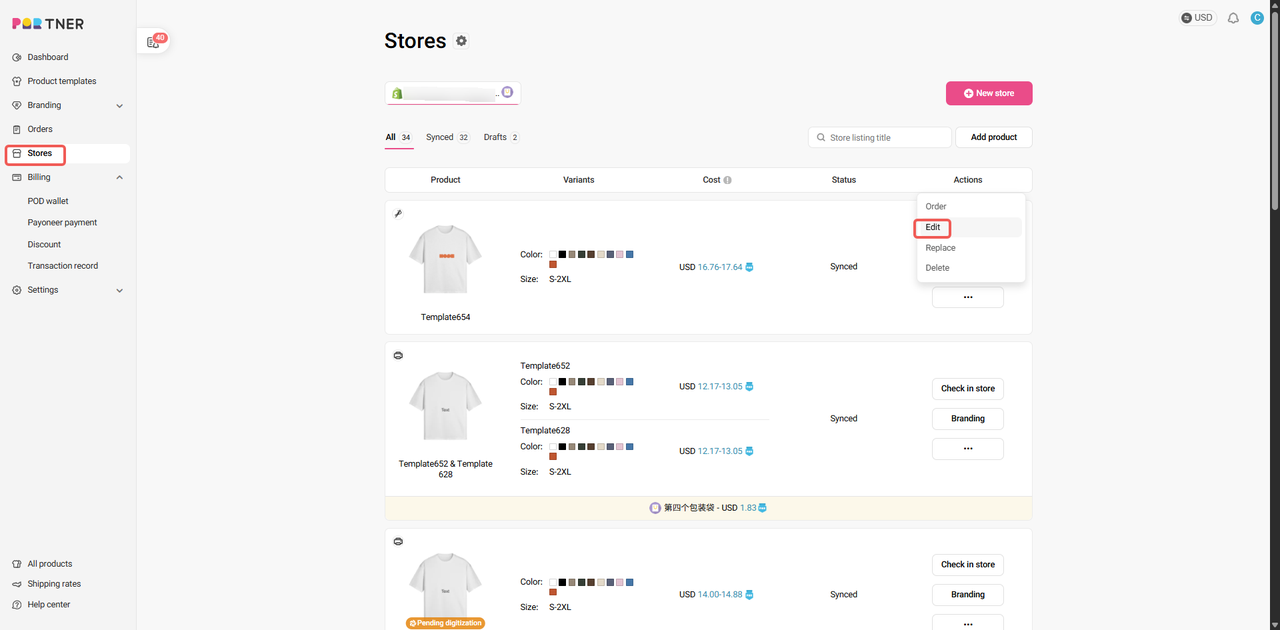
5. Make changes and press "Continue to publish";
6. Any changes to the product will be synced to your online store.
Note that after the updates, the visibility of your store listings will stay the same as what you set previously.
How do I change the variants of a published product?
If a product has been published to your online store, you can only change its variants by publishing it to your store again.
1. Go to Dashboard > Product Templates > find the template of that product;
2. Press "Add to store" and select the store where you want to publish the product;
3. Select product colors and sizes, edit product details, set product retail price, and click the "Continue to publish" button;
4. You may keep or delete the previous product in your store.
How do I sync product updates to my store listings?
1. Go to Dashboard > Stores;
2. Choose the online store where the product was published and find the product;
3. Click the "Edit description" button;
4. After updating the product description, click the "Continue to publish" button.
Note that you cannot change the product variants(sizes & colors) unless you publish a new product.
Where can I manage my products?
Go to Dashboard > Stores > manage any of the following PODpartner products:
1. Products that you have published to your online stores;
2. Products that you have saved as drafts;
3. Products that failed to publish.
Why do prints still show color differences even when using CMYK color mode?
Even if your design file is created in CMYK color mode, slight color variations between what you see on screen and the final print are normal.
This happens because digital displays (RGB) and printers (CMYK) use two completely different color systems:
- RGB (Red, Green, Blue) — used for screens. It combines light to produce bright and vivid colors. Color appearance may still vary between different screens due to variations in brightness, calibration, and display technology.
- CMYK (Cyan, Magenta, Yellow, Black) — used for printing. It mixes inks that reflect light, so printed colors appear softer and less luminous, often resulting in a slightly darker appearance compared to what you see on screen.
Can embroidery and custom layers overlap on a product?
While we support combining embroidery and custom layers (DTG printed) in the same area, we recommend avoiding overlapping these elements. Overlapping embroidery and custom layers may cause the design preview in your store’s Customizer to display inaccurately, which can confuse customers about the final appearance. For the best visual clarity and to ensure customer expectations are met, please try to place embroidery and custom layers in separate, non-overlapping areas whenever possible.
What should I do if the PODpartner Customizer doesn't appear on my product pages?
If the PODpartner Customizer isn't showing the customization options, verify:
- Your products actually contain layers that support the customization feature. (Must be added during the design phase on the PODpartner website)
- You've completed the prerequisite setup in your PODpartner dashboard (synchronized product templates with custom layers and configured Custom Settings)
- You've properly added the PODpartner Customizer section to your product template in Shopify;If your theme cannot add our app, please contact us and provide the theme name — our technical team will assist you.
Which Shopify pages can use the PODpartner Customizer?
The PODpartner Customizer is designed specifically for Shopify product pages. Add the customization feature to product templates where you want customers to access personalization options. The customizer won't function properly on other page types like collections, blogs, or static pages since it requires product-specific data to enable customization.

- How it works
- Shipping
- About us
- Blog
- CapabilitiesPersonalizationJumbo DTG
- Help center
 USD
USD