
 USD
USD
How to Create Embroidery Mockups for Print on Demand Success?

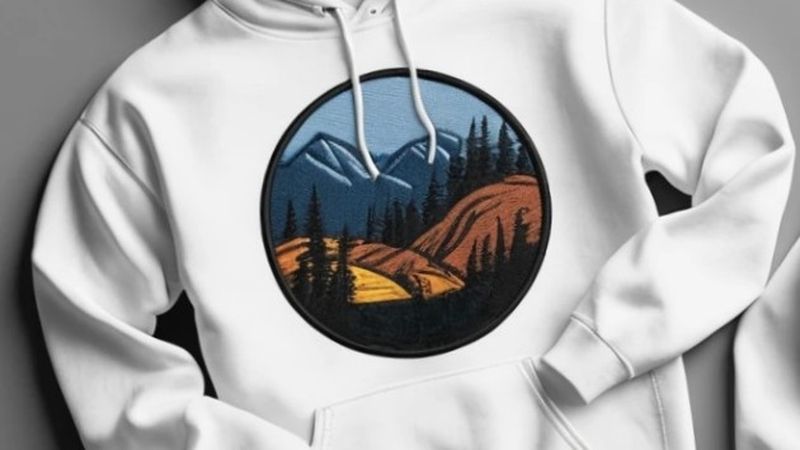
You have made a logo or artwork to be embroidered on clothes. However, how could customers know how the end product will appear? Embroidery mockups come in handy there. Be it the introduction of a new design, changing the design of your product or verifying the samples, realistic mockups allow you to present the concept before you have to lift a needle.
The embroidery mock up reveals the actual look, depth, and color of your design. It also presents your listings as professional and it creates trust with buyers. It also prevents misunderstanding regarding the appearance of embroidery as compared to that of a printed design.
This guide will explain everything you need to know about embroidery mockups even if you are not a designer.
What Is an Embroidery Mockup and Why Is It Important?
An embroidery mockup is a digital preview. It shows how your stitched design will appear on clothes or accessories. It can be a layered Photoshop file, a transparent image you can place over photos, or a 3D image created with an online tool.
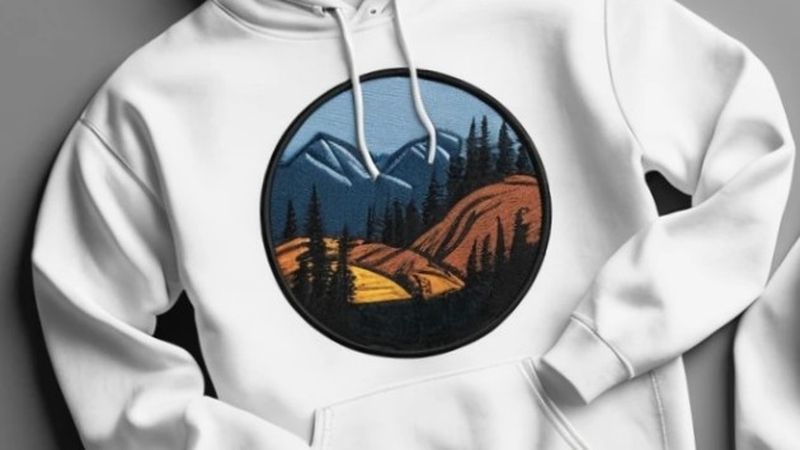
Mockups are not just pictures. They are powerful marketing tools for your product pages, social media posts, and approval before production. Customers will be more convinced that your end product will match exactly the picture. This is so when your mockups appear real and professional.
- Product Listings: Show embroidered logos, patches, or text on T-shirts, hoodies, or hats.
- Marketing Materials: Banners, email or advertisements can be used to entice customers with the help of mockups.
- Pre-Production Proofs: Share mockups with the clients or the manufacturers, prior to actual sample making.
Quick Benefits of Embroidery Mockups
- Shows Texture: Stitches and thread depth can be depicted clearly.
- Develops Credibility: The true to life images enable the buyer to visualize the quality and appearance of the end product.
- Less Surprises: Visual clarity avoids more surprises, satisfied customers, and easier sales.
Essentially, a suitable embroidery mock-up will assist in transforming a two-dimensional design into a realistic and clear representation of the final work of embroidery.
Types of Embroidery Mockups
There are various products and applications that require various types of mockups. These are the three primary categories that will be particularly useful should you sell print-on-demand or design embroidery.
Flat Apparel Mockups (T-shirts, Sweatshirts)
Flat mockups show your embroidered design on clothes laid flat on a plain background. They are simple and clean, great for online stores or catalogs where you want the design to stand out.
These work best for logos or text placed on the chest or center of the shirt. Flat mockups also help keep a consistent look across your whole product range.
Tip: Look for templates or tools that let you change lighting and fabric texture to make your mockups look more real.
3D or Angled Mockups and Lifestyle Shots
These show your product from a natural angle like a hoodie worn by a model or a hat sitting on a table. 3D mockups add depth and make your product look more realistic and interesting.
They are perfect for ads, social media, or sites like Etsy. This is where people like seeing products in real-life settings. Angled views show how embroidery threads catch the light which is making the design look authentic.
Tip: Pick mockups with natural shadows and fabric wrinkles to help the embroidery blend in naturally.
Small-Area Mockups (Hats, Chest Logos, Sleeves, Patches)
Embroidery often looks best in small, detailed spots like the front of a hat, a sleeve logo, or patches. These mockups focus on those smaller areas and show close-up details, thread texture, and fine stitching.
They are perfect for things like company merchandise, sportswear, or streetwear where the branding is small but important.
Tip: Use high-quality close-up mockups that clearly show the stitch details to highlight the premium feel of your embroidery.
How to Make a Realistic Embroidery Mockup?
Now that you know the different types, here is how to create embroidery mockups that look real and help you sell.
There are two main ways. These include using professional Photoshop (PSD) templates or online mockup generators. Each option has its own benefits depending on your skills and how you like to work.
Method 1: Using High-Quality Embroidery Mockup PSDs
If you are comfortable using design programs like Adobe Photoshop, PSD templates give you the most control and detail for your embroidery mockups.
Here is a simple guide.
- Pick a good mockup file
Look for embroidery-specific PSD templates that already have realistic stitch effects, thread textures, and lighting. You can find these on sites like Creative Market or Envato Elements. - Open the PSD in Photoshop
Load the file and find the "smart object" layer, usually named something like "Your Design Here." - Add your design
Double-click the smart object layer, paste your logo or artwork, resize and position it how you want. Then save and close the smart object. Your design will automatically appear on the garment. - Fine-tune lighting and shadows
Make small adjustments to brightness, thread depth, or fabric highlights to make the embroidery look more natural and real. - Save your mockup
Export your finished mockup as a high-quality PNG or JPEG to use on your product pages or marketing materials.
Using PSD mockups lets you create professional and realistic previews that help customers to see exactly how your embroidery will look.
Pros
- You can have a total creative control.
- Consumers can experience the most realistic stitch textures.
- PSD mockups are great for designers or brands building a visual identity.
Cons
- It requires Photoshop skills.
- PSD mockups are time-consuming for large catalogs.
PSD mockups are worth the extra effort if you want your product photos to stand out with realistic depth and thread detail.
Method 2: Using Online Mockup Generators
Not everyone has the time or software to make mockups by hand. That is where online embroidery mockup generators are really helpful.
These tools let you upload your design and quickly see it on different products like shirts, hats, or bags often in just seconds. You can also change thread colors, design placement, and backgrounds without needing to install anything.
Some popular options are built into print-on-demand sites. While others offer Embroidery mockup generator free websites with ready-to-use templates.
Why use online generators?
- They are fast and easy to use and no design skills needed.
- They give consistent, professional-looking images for all your product listings.
- Perfect for sellers who update designs often or have many products.
Pro Tip
Pick generators that show real thread texture instead of just placing a flat design on fabric. This makes your mockups look more real and believable.
Online mockup generators are a great way to save time while still showing off your embroidery designs clearly and professionally.
Recommendation: Make Mockup Creation Easy with PODpartner
It is helpful to have mockup creation and order fulfillment all in one place if you are building a print-on-demand business and want to save time.
That is what PODpartner does. You can upload your embroidery designs and see instant previews on different types of clothing. Then you can use the same files to print or embroider products on demand. It support both direct-to-garment (DTG) printing and embroidery. So, you can mix and match for your catalog.
You don't need extra software or templates because PODpartner includes realistic mockups right in their system. This is great for sellers with multiple stores or who update products often.
PODpartner helps you launch embroidered products quickly. This is true with lots of blank apparel choices, true-to-life visuals, and automatic previews. It will help you in keeping your listings looking professional and consistent.
It is an easy way to save time and get your products out there fast.
FAQ
What is an embroidery mockup generator?
An embroidery mockup generator is an online tool where you upload your design and quickly see how it will look as stitched embroidery on clothes. It is easy to use and helps you create consistent photos for your products.
Are there free embroidery mockup generators?
Yes! Many online tools offer free versions with limited templates. For more realistic images and more product options, paid tools or platforms like PODpartner are a better choice.
What makes an embroidery mockup look real?
A realistic mockup shows stitch depth, thread shine, and the texture of the fabric. Choose templates or generators that copy how light and shadows fall on real embroidery.
Can I use embroidery mockups for marketing?
Yes! Embroidery mockups are great for product listings, ads, emails, and social media. They help you show off your products even before they are made.
Conclusion
Embroidery mockups are not just pictures. They are a key part of selling your products. They help you show customers exactly what your embroidered items will look like. This will be making your designs feel real and trustworthy. By knowing everything about embroidery mockups you can turn flat designs into clear and eye-catching images that help sell your products.
Are you ready to get started? Try making your first mockup today! Download a Embroidery mockup free template, try an online embroidery mockup generator, or explore easy tools of PODpartner to bring your designs to life.