
 USD
USD
3 Simple Steps of How to Add Made-to-Order on Shopify


Learning how to add made to order on Shopify is an important step for online sellers to ensure they tap into the massive custom products market. It also means you don't have to deal with lots of inventory, as the custom products are only sold after someone buys them.
Made-to-order products enjoy massive popularity among both sellers and buyers because personalized products like custom hoodies or any other such item are loved by people for personal usage as well as gifting.
In this article, we’ll discuss three different ways of how to add custom orders on Shopify. So, keep reading!
Method 1: Simple Text Fields for Basic Customization
The quickest and easiest way to add custom products to your Shopify store is through the custom text fields that can be customized. This process requires a number of changes to your theme's code, but you don't need any technical knowledge or coding skills to do it.
This method is ideal for Shopify stores that want minimal customizations while selling their products and don’t want to rely on third-party sources.
How to Add a Custom Text Field on a Shopify Product Page
Follow these steps to add a custom text field on a Shopify Product page:
- First of all, you have to log in to your Shopify admin dashboard to access your Online Store.
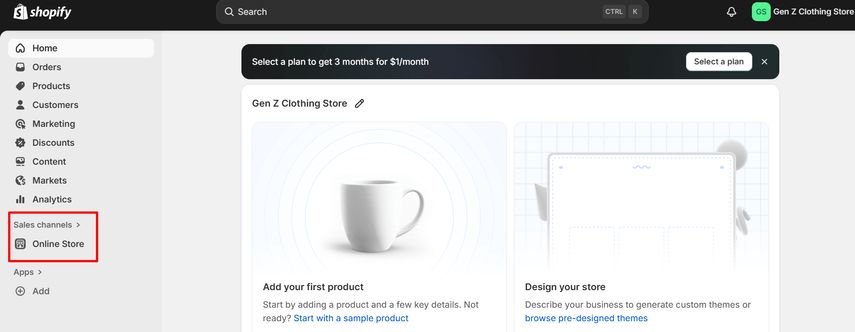
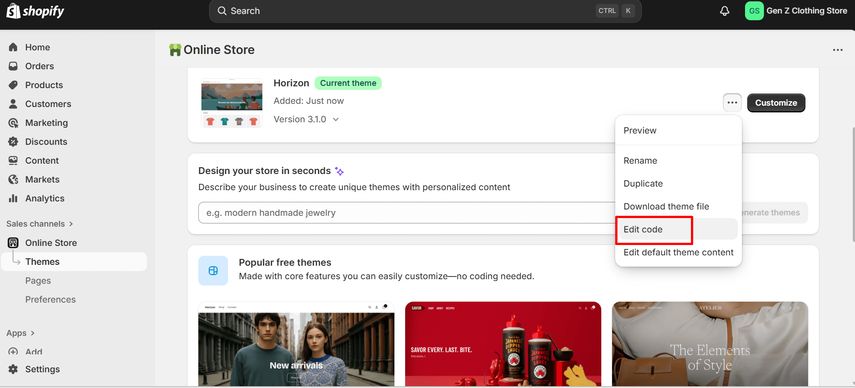
- You'll see your active theme under the Online Store section. Choose to edit your theme's code.
- You'll see multiple theme code files. Don't get overwhelmed by the code, as you don't have to make many changes. Just go to the Templates folder and open the product.liquid file.
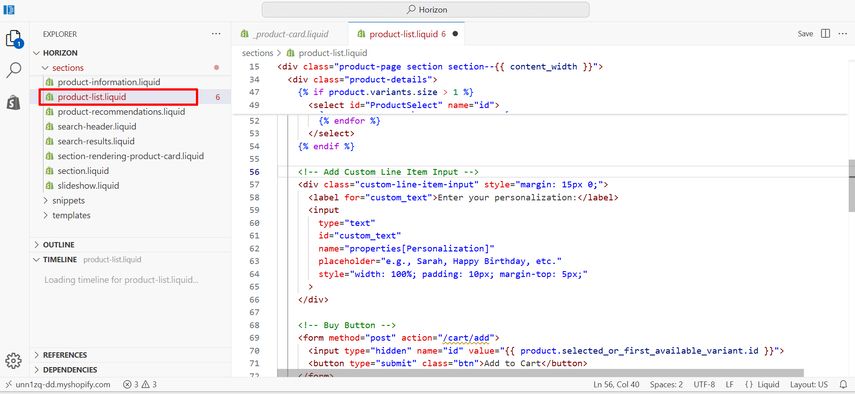
- Paste the following code in the file to add a Shopify custom form field to your theme.
<!-- Add Custom Line Item Input -->
<div class="custom-line-item-input" style="margin: 15px 0;">
  <label for="custom_text">Enter your personalization:</label>
  <input
    type="text"
    id="custom_text"
    name="properties[Personalization]"
    placeholder="e.g., Sarah, Happy Birthday, etc."
    style="width: 100%; padding: 10px; margin-top: 5px;"
  >
</div>
In these simple steps, you’ll have a custom text field on your Shopify product page.
Method 2: Dedicated Apps for Complex Custom Orders
Shopify's built-in features, like the option to add custom text fields, are enough to fulfill the requirements of small-sized businesses and startups selling custom orders.
However, if your requirements are complex and you want to scale your business, then you might want to consider exploring third-party apps that provide more versatile features.
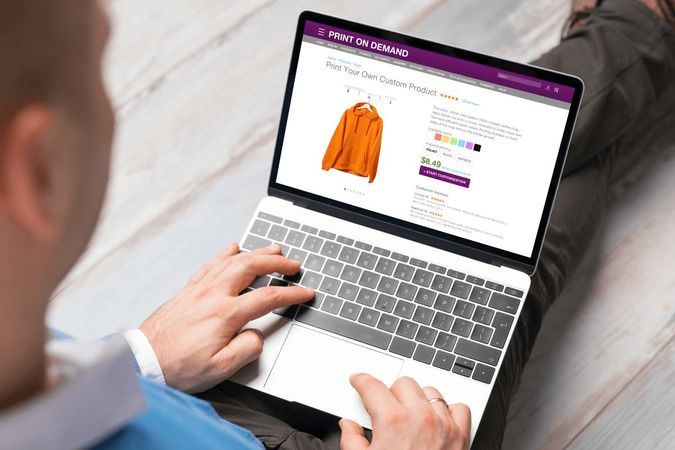
Using dedicated apps for complex custom orders is ideal for:
- Shopify stores that offer multi-option personalization/customization
- Products for which the customers have to upload images or certain files
- Made-to-order items that have dynamic pricing
- Businesses with high order volume
- Large-scale products with custom engraving, embroidery, POD, etc.
Why Apps Are Essential?
Shopify’s themes have certain limitation that makes it important to rely on third-party apps to extend the functionalities. Here are the key reasons why these apps are essential for large-scale custom orders:
- Handles conditional logic by showing specific fields as per the customer's choices. For example, if a customer has selected “engraving: yes”, then the relevant text field will be shown.
- Allows customers to upload logos, artwork, or any images to customize the order.
- These apps also have a live preview or mockups section to ensure the customers can see their customized orders.
- Dynamic pricing options with automatic price adjustments is available. For example, a store can charge an extra $10 for engraving and configure the app accordingly.
- Shoppers get to choose from multiple variants without going through each of them individually in the traditional Shopify theme.
- Ideal to handle complex product customization, such as shoes, jewelry, and any other apparel item.
Popular Personalization Apps on Shopify
Some of the most popular apps for Shopify are:
- Product Personalizer
- Infinite Options
- Zepto
- Customify
- PODpartner
If you are interested in learning more about these apps, you should check out our complete guide to the best personalization apps for Shopify.
Method 3: Use Print on Demand Service to Add Customization Options
If you are looking for a reliable and efficient way of selling personalized products without the hassle of managing production, inventory, or complex product customization apps, then you should consider using a print-on-demand (POD) service that comes with personalization tools.

These services are different from the traditional custom-order setups, where you have to rely on multiple apps or do manual code editing. Instead, a POD platform like PODpartner is designed to handle personalization automatically as per the customer's inputs.
Why Use POD Apps for Made-to-Order Shopify Products?
By now, we've discussed all major aspects of how to add made-to-order on Shopify. If you are wondering why you need to use POD apps for that, here are the key reasons:
- Eliminates the complexity of custom theme editing
- Ensures a smooth and hands-off production workflow
- Automatic mapping of customer inputs to orders
- Minimized the need for external custom-form apps
- Brings scalability to your business
- Helps your business in offering personalized apparel without upfront charges
Comprehensive POD solutions are ultimately useful to streamline the entire journey from product design to manufacturing and successful order fulfillment.
PODpartner Customization: A Free and Built-in Personalization System
PODpartner customization stands out as the best tool to sell customized products on Shopify because:
- 100% free with support for up to 3 customization layers per product
- Direct integration with Shopify
- Easy to set up, which is highly useful for beginners
- Complete automation from syncing customer inputs to production
Working of PODpartner Customization
The working of PODpartner customization is also quite easy, involving 4 steps:
- Select any apparel from the extensive catalog, such as t-shirts, hoodies, sweatshirts, etc.
- Design your template by creating a base artwork and enabling customizable layers.
- With a single click, you can publish the custom order to Shopify with all variants and custom fields
- Configure your product page display by selecting how the custom fields will appear on the product page.
PODpartner has a wide range of templates and comprehensive guides to help you create a user-friendly customization workflow.
Conclusion
This detailed article has dealt with all major aspects of how to add a custom order on Shopify and deal with Shopify custom form fields. The process of offering made-to-order products on Shopify boils down to the fact that multiple methods are available that you should choose depending on your specific requirements.
To sum it all up:
- Method 1 is perfect for the quick Shopify customer form fields. It is simple, free, and suitable for low-volume stores.
- Method 2 covers advanced customization via powerful third-party apps. It gives you complete control over file uploads, price adjustments, and conditional logic.
- Method 3 is all about partnering up with a POD platform like PODpartner to get the most streamlined, scalable, and automated workflow.
Choosing the right method can help you take your store to the next level via higher customer satisfaction, reduction in order returns, and creation of repeat buyers. So, consider your requirements and choose the method that suits your goals and budget.
Further reading

No Order Minimums

No Membership Fees

No Unsold Stock

No Quality Concerns
Only Creativity, Satisfaction, and Profits!