
 USD

How to Change Etsy Store Name: 2026 Tutorial


It is a little stressful to change the name of your Etsy shop. It is particularly true when you already have sales, positive feedback, or a following. Most vendors fear losing clients, misdirecting old clients or damaging the credibility that they have labored to achieve. They are also reluctant due to the uncertainty of rules of Etsy or fear of choosing a name that will not fit into the future.
These worries are totally normal. However, changing your shop name does not have to be stressful if you do it carefully. You can update your store name without losing what you have built with a simple plan and the right steps.
This guide will walk you through how to change Etsy store name safely in 2026. You will learn the rules, how to do it on both desktop and mobile, and what to update afterward to keep your shop running smoothly.
What You Need to Know Before Changing Your Etsy Shop Name?
Before learning how to change Etsy store name, it is important to know Etsy’s rules. Taking a little time to plan can save you headaches later and stop problems like getting stuck with a name you don’t like.
The Name Change Limit
Etsy lets you change your shop name up to five times after you open your store. After that, the name is locked and can’t be changed again.
This rule helps avoid confusing buyers with lots of name changes. So, pick a name you’re happy to keep for a long time. Avoid trendy names that might feel old quickly, and think about how the name will fit your business as it grows.
Character Limits & Restrictions
Your Etsy shop name needs to follow these simple rules:
- Between 4 and 20 characters long
- No spaces at the start or end
- No special symbols or punctuation
- Must be unique on Etsy
Also, don’t use names that belong to other brands or are trademarked. Using those can cause problems or force you to change your name later.
Availability
If someone else already uses the name, you would not be able to pick it. Etsy checks this for you when you type in a new name, so you don’t waste time.
If your favorite name is taken, try small changes like adding words such as studio, shop, or co. You can also tweak the spelling a bit. However, it is important to keep it easy to read and understand.
Step-by-Step Guide to Change Etsy Shop Name (Web/Desktop)
Using a computer is the easiest way to change your shop name because you have full access to all the settings. The process is quick and simple.
Before you start, make sure you are logged into the right Etsy account that is connected to your shop. It is also good to have your new shop name ready. So, you can move through the steps smoothly.
Step 1: Log in to Your Etsy Account
Open a secure browser and sign in to your seller account. This helps to avoid making changes to the wrong shop by mistake.
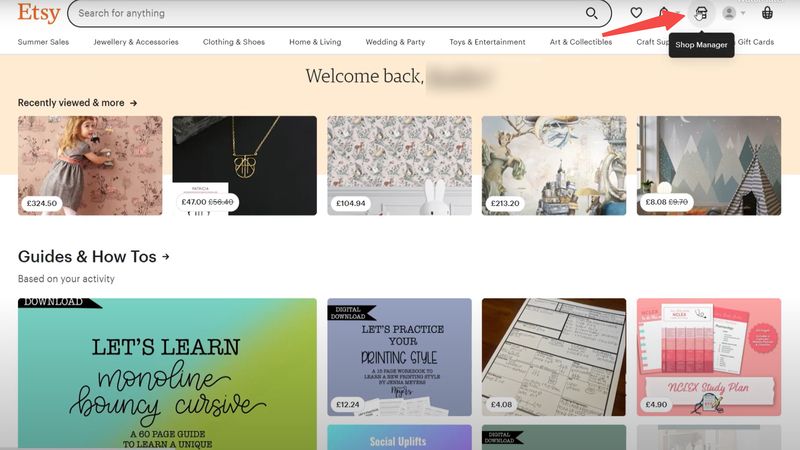
Step 2: Go to Your Shop Manager
Once you are logged in, go to your Shop Manager. This is where you control your Etsy shop and make changes like updating your shop name.
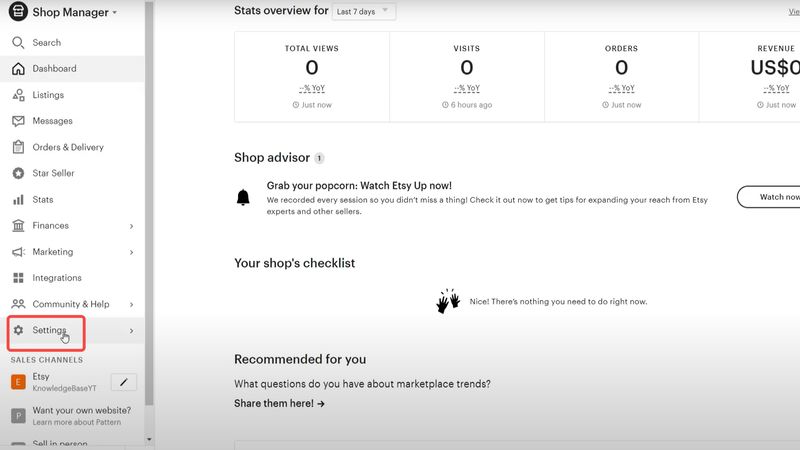
Step 3: Click on Settings
On the left side of your Shop Manager, find and click Settings. This will open a menu with different options for your shop.
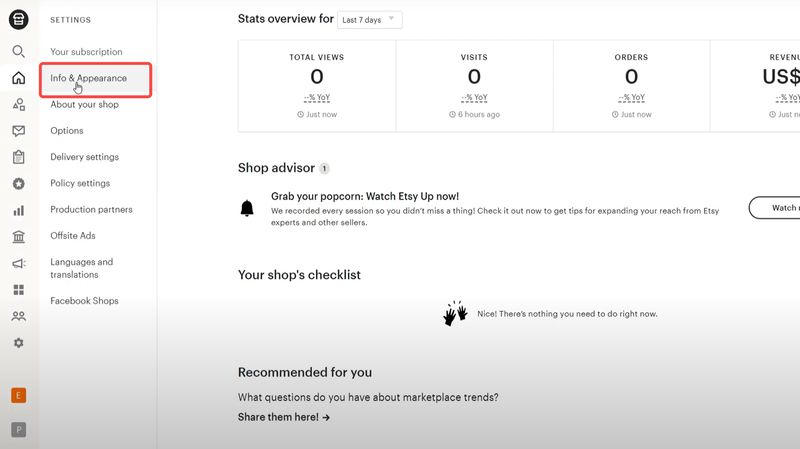
Step 4: Click on Info & Appearance
In the menu, click on Info & Appearance. If you have not used up all your name changes, you will be able to update your Etsy shop name here.
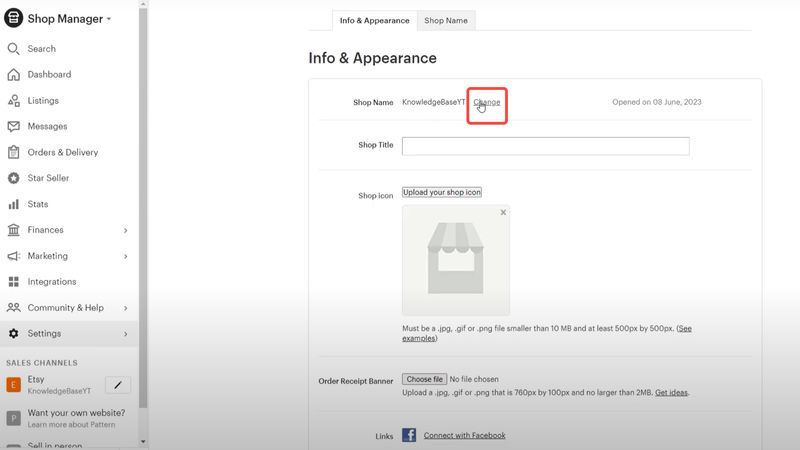
Step 5: Click Change Next to Your Shop Name
Click the Change button next to your current shop name, or click on the Shop Name tab. This will open a new window where you can type in your new shop name.
Step 6: Type Your New Shop Name and Save
Enter the new name you want, then click Save.
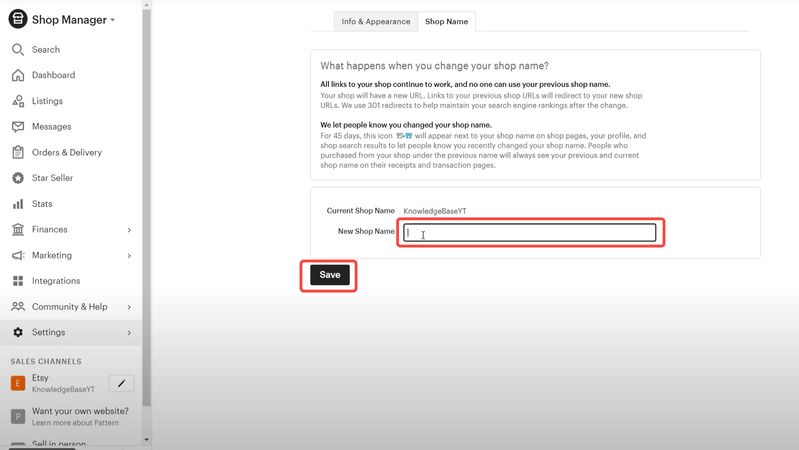
If the name you picked is already taken or has been used before, you will see a message asking you to choose a different name.
How to Change Etsy Shop Name in App & on iPhone?
When it comes to how to change Etsy shop name in app, you must know that you can’t do it directly here.
You can’t change your Etsy shop name directly in the mobile app. Instead, open a web browser on your phone or computer and go to Etsy.com. From there,
- Go to Shop Manager
- Click Settings
- Tap on Info & Appearance > Shop Name to update your name.
Type in your new shop name, making sure it has no spaces or punctuation and is under 20 characters. Then save your changes. Etsy will let your customers know about the new name for 45 days after you update it.
The process is similar for how to change Etsy shop name on iPhone. The process is same. You just need to use your iPhone browser for this.
What to Do After Changing Your Etsy Store Name?
Changing your shop name is just the first step. Here are some important things to do next to avoid confusing your customers and protect your sales.
Update Your Visual Branding
Change your shop banner, logo, and profile picture to match your new name. Keeping your look consistent helps buyers trust your new brand.
If your old shop name shows up in any product photos or mockups, update those too.
Update Your Social Media and Links
Make sure to change your shop name on all your social media pages like Instagram, TikTok, Pinterest, Facebook, and any link-in-bio tools you use. This stops broken links and helps customers find you easily.
Tell Your Followers and Past Customers
Share a simple announcement about your name change. Keep it clear and positive.
For example: We have changed our shop name to better match our brand. Same great products, same quality, just a new name!
Refresh Your SEO Details
After changing your name, update your shop title, description, listing titles, tags, and keywords. This helps Etsy understand your shop and keeps your listings easy to find.
Why Sellers Rebrand When Scaling?
Many sellers pick a quick name just to get started. But as their sales grow, that name might not fit anymore. If you want to add more products, change your style, or build a brand that lasts, a better name can help support that growth.
This is common for print-on-demand sellers who start with small designs and then move to full collections. Tools like PODpartner make it easier to grow your product range while keeping your brand consistent after a name change.
FAQ about Changing Your Etsy Shop Name
Why can't I change my Etsy shop name?
You might have already changed it five times, the name you want is taken, or Etsy has rules that stop some changes.
How many times can I change the name of my Etsy store?
You can change it up to five times after opening your shop.
How to tell if an Etsy name is taken?
Just type the name in the shop name box in your settings. Etsy will quickly tell you if it’s available or not.
What is the difference between shop title and shop name on Etsy?
Your shop name is your unique ID and part of your shop’s web address. Your shop title is used for search purposes and can have keywords. You can change the shop title anytime.
Conclusion
Changing your Etsy shop name does not have to be hard or stressful. If you know the rules, follow the right steps, and update your branding afterward. It is a simple process as now you know how to change your Etsy store name on desktop, mobile, and iPhone and what to do next to keep your shop successful.
Further reading

No Order Minimums

No Membership Fees

No Unsold Stock

No Quality Concerns
Only Creativity, Satisfaction, and Profits!