
 USD
USD
Personalization Full Comparison: Printful vs. Printify vs. Gelato vs. PODpartner

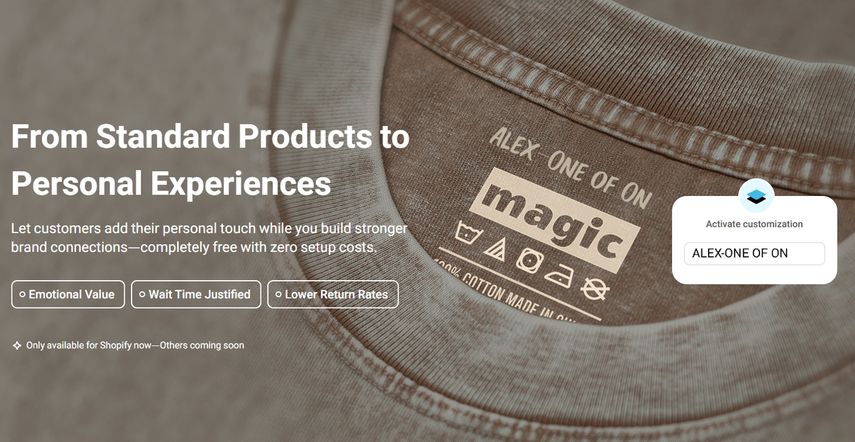
Personalization refers to the process of allowing customers to actively choose and adjust products or services based on their own preferences and needs. Instead of passively accepting pre-made items, customers become part of the product design itself. Offering personalization is not just about meeting customer expectations. It can also bring significant benefits to your business: strengthening emotional connection and brand loyalty, increasing both order volume and average order value, and gathering valuable insights into customer preferences. In this scenario, customers are typically more willing to tolerate an extended wait for their customized products.
Based on this report, here are some quick recommendations for different business models:
- Entrepreneurs seeking product variety: Printify stands out. With its vast supplier network, it offers the widest range of customizable products to meet diverse market needs.
- High-end fashion brands: PODpartner is the ideal starting point. It's free, automated, built-in personalization feature, and flexible design areas make it a strong choice for building a distinctive clothing brand.
- Businesses prioritizing fast logistics: Gelato is the go-to choice. Its global network of local production partners ensures quick delivery of international orders.
| PODpartner | Printful | Printify | Gelato | |
|---|---|---|---|---|
| What are they called | Personalization | Personalization | Personalization | Personalization |
| Supported products | All products | All products | All products | Most products (focuses on apparel/home) |
| Can pre-set custom layer on POD platform? | Yes | No | Yes | Yes |
| Customize in real-time* | Yes | No | Yes but limited | Yes but limited |
| Fees | Free; customization is included in the base price. | Free; personalization is included in the base price. | Free; personalization is included in the base price. | Paid service; 4-6% transaction fee per garment |
| Integration platform | Shopify | Shopify, Etsy, WooCommerce, Wix, Squarespace | Shopify, Etsy, Printify Pop-Up Store, TikTok Shop US | Shopify, Etsy, Amazon, TikTok Shop, BigCommerce |
| Order synchronization methods* | Fully automated | Fully automated | Fully automated | Fully automated |
| Personalization elements synchronization methods* | Fully automated | Need manually deals with personalization; Or use third-party apps to auto-deal with orders before production | Fully automated Printify Pop-Up Store, TikTok Shop US, Etsy( personalize text) Need manually deals with personalization before production from other platforms | Fully automated in Shopify & Etsy(personalize text); Need manually deals with personalization before production from other platforms |
POD platform integration methods vary greatly depending on the e-commerce marketplace. Always check with your POD provider's support team to understand the specific setup and functionality available for your chosen selling platform.
- Personalize in real-time: Refers to the ability for customers to add personalized elements and instantly preview the final product online before placing an order.
- Order synchronization methods: Refers to the automatic transfer and synchronization of all necessary order data, like product specifications, order status, and customer shipping details, to the connected POD platform.
- Personalization elements synchronization methods: Refers to the system component responsible for capturing and synchronizing the customer's customized information (such as personalized images or text) from the user interface to the POD production platform.
Printful - Personalization
While Printful is one of the largest POD platforms, it's a common misconception that they offer a live, built-in customization tool for customers.
The reality is, Printful's Product Personalization Tool is more of a workflow. It doesn't allow customers to drag, drop, and see a real-time preview of their design on your website. Instead, customers submit their personalization details through order fields on platforms like Etsy or Shopify.
As the seller, you then have to go into your Printful dashboard to manually apply and approve these changes before the order can go into production. Think of it as an Order Manager who helps you receive the customer's personalization elements, but you still have to manually paste them onto your base design. The main benefit is that Printful doesn't charge extra for these personalized elements, but it's not a hands-off, automated solution.
For enterprise-level users, Printful's Enterprise plan includes a BETA version of an embedded Design Maker. This white-label tool lets customers add text and images directly on your website. However, it's still in the testing phase and not yet available to all users. Brands must submit an application through Printful's enterprise application form and be approved to gain access.
Key Features of Printful's Personalization
- Supported Products: Almost all of Printful's products
- Free, But Needed Manually Process: The tool is free, but while order data, like product specifications, order status, and customer shipping details, will automatically import into your Printful dashboard, you will still need to manually confirm customer personalization elements before production
- Integrating with Platforms: Shopify, Etsy, WooCommerce, Wix, Squarespace, etc. For automated personalized orders on Shopify, third-party plugins are required
- Feature Limitations and Alternatives: Printful doesn't have a native function for uploading a design template and pre-defining editable areas for automated production. If you need a solution that allows you to upload a design template with pre-set editable fields for automated customization, you might consider alternatives like Gelato and PODpartner
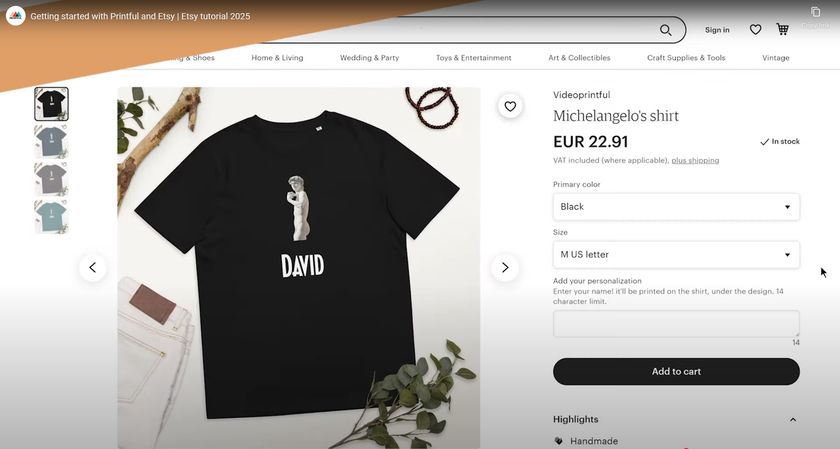
Manually Processing Personalization Elements
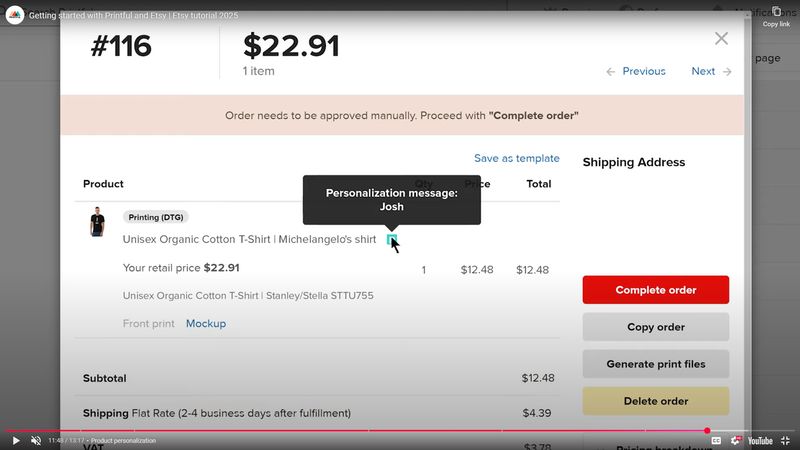
Personalize order data will auto import to Printful dashboard, but not start to produce. You'll need to manually edit and approve customer personalization elements before production.
1.Open the personalized orders in your Printful Dashboard.
2.Hover over the blue icon to view the content the customer submitted (text or an image preview).
3.Click Edit to open Printful's Design Maker tool.
4.Upload your original design file (recommend a high-resolution PNG/JPG at 300 DPI).
5.Add the customer's provided content (text/images) and check the print area.
6.Once you've confirmed everything looks correct, click Proceed or a similar button to continue.
You can manually deal with the personalization elements, which shows P next to the order listing.
Pricing Details
Printful's Product Personalization Tool is free to use, with no setup or monthly fees for standard customizations. Base product prices include single-position personalization; shipping is added per order. Extra fees apply for non-standard options: inside labels ($0.99 each), outside labels ($2.49 each), additional print placements ($1 per placement/item), or embroidery digitization ($2.95-$6.50 per design, one-time). Two standard print areas include no extra cost. The optional Growth plan ($24.99/month) offers 20-33% discounts but isn't required. Test sample orders to verify quality.
The information above is for general reference. For specific product details and pricing, you'd better contact customer support.
Personalization is only one piece of the picture — for the full breakdown of pricing, quality, and fulfillment models, see our complete PODpartner vs Printful comparison.
Printify's Customization - Personalization
Printify's designer tool is called Product Creator Tool. This is a free online design tool for all sellers. You can design your products in this on-page tool. When you have personalized orders, you should manually edit these personalization elements within the Product Creator Tool.
The Personalization Tool
- Personalization Elements Synchronization in Different Platforms: One is auto-processing, applied in Printify Pop-Up Store, Etsy(personalize text), or TikTok Shop US; the other is manual processing, applied in Shopify, Etsy(personalize image), etc.
- Supported Products: Supports text or image customization on all products. Embroidery items (e.g., hats, backpacks) and some all-over-print products are excluded due to print area restrictions
- Product Creator: A seller-focused tool for adding text or graphics and creating mockups. It supports customizable elements, but lacks a customer-facing real-time editing interface, requiring third-party apps like Customily for customer previews
- Real-Time Previews are limited: Only in Printify Pop-Up Store, and TikTok Shop US
- No Extra Fees: Custom content within standard print areas incurs no additional cost, included in the base product price for single-position printing. Multi-position or oversized prints may add fees, depending on the supplier
Manually Processing Personalization Elements
Printify's personalized order data is automatically imported to dashboard. You should confirm or edit those personalized elements before production.
For orders from Shopify & Etsy Image:
1.When your personalized orders comes in, it can not be produced automatically
2.Open Product Creator: In the Printify dashboard, find the order and access Product Creator to edit
3.Apply Personalization: Upload customer images or add text, adjusting size, position, or color for accurate printing
4.Submit to Supplier: Approve the design and send it to the chosen supplier for production
5.If you're using Shopify, you might use third-party apps like Customily for real-time customer previews or full automation
Tip: Etsy orders can use Automated Personalization to apply text automatically.
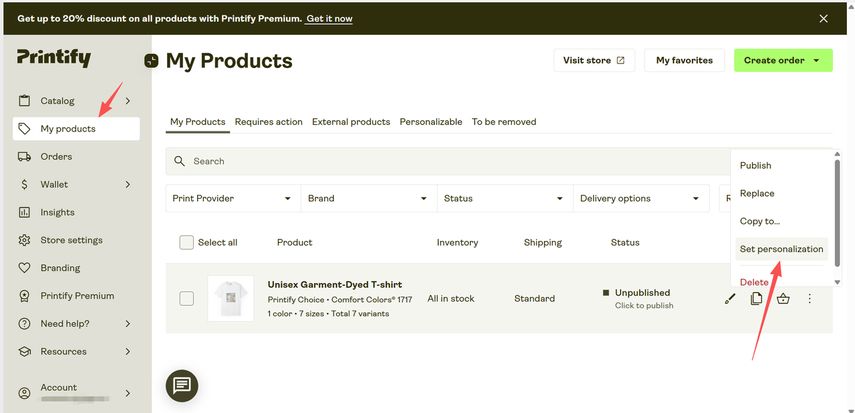
Auto Processing Personalized Elements
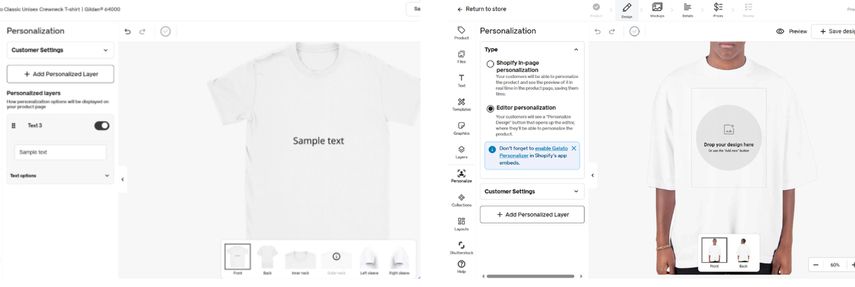
As you can see, what I connect with is the Shopify store. I can't add personalized layers to the designer tool.
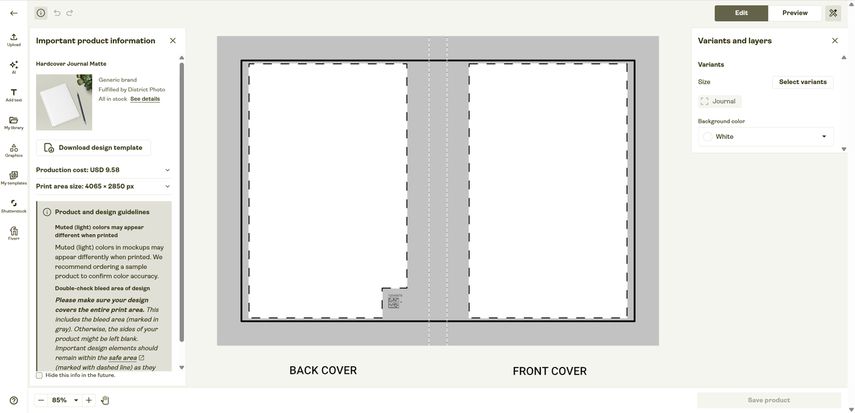
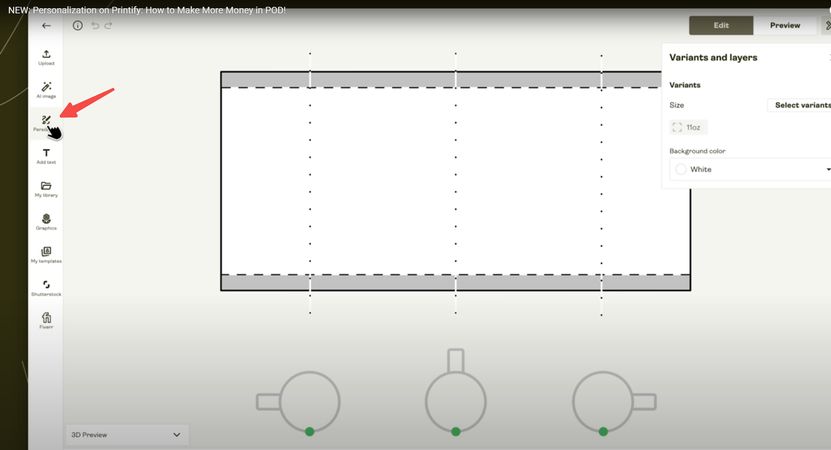
You can only add personalize layers on e-commerce channels like Printify Pop-Up Store; Etsy (for text); TikTok Shop US. You can pre-set personalize layers on the Product Creator Tool. In this case, your personalized orders(order with personalization elements and customer info) will auto import to Printify dashboard and auto production.
1.Pre-set personalize layers for your clients
2.They can add their own custom content on the product page, and it will be automatically synchronized to Printify production
3.Personalized orders will auto import to Printify dashboard and start to produce. No manual processing is required
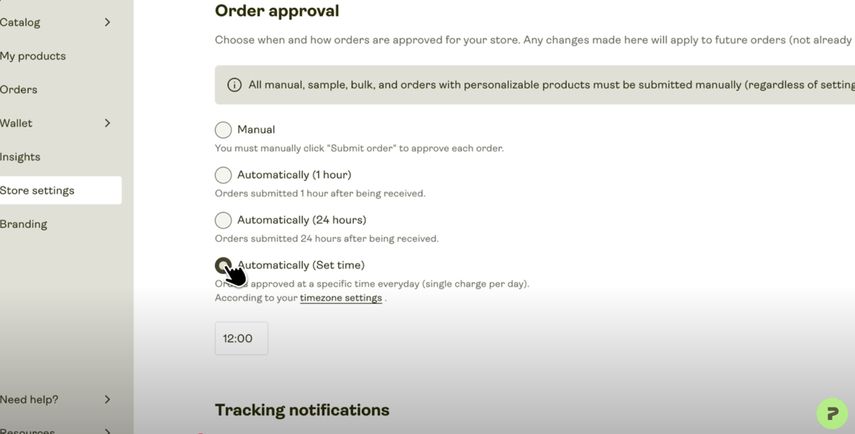
Tips: You can enable an auto production in Store Settings → Order Settings to allow orders that have been previewed and confirmed by customers to automatically enter production without your manual approval.
Pricing Details
Printify's Personalization Tool is free to set up and use, with no monthly fees or charges for basic customizations. You pay only the standard product price, printing, and shipping per order. Multiple customized areas within standard print zones incur no extra fees, but special features like embroidery may add $2-$6.50 per item. The optional Premium plan ($29/month) offers 20% product discounts but isn't required. Test sample orders in your dashboard to ensure quality.
The information above is for general reference. For specific product details and pricing, you'd better contact customer support.
For a broader look beyond personalization, check the full PODpartner vs Printify comparison.
PODpartner's Customization
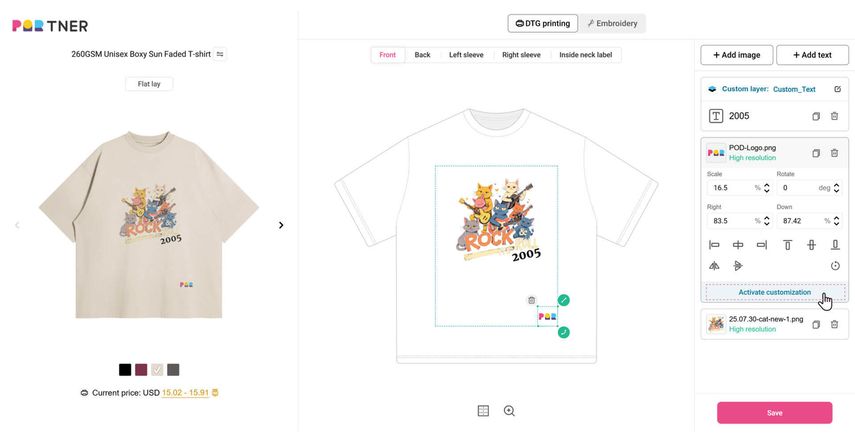
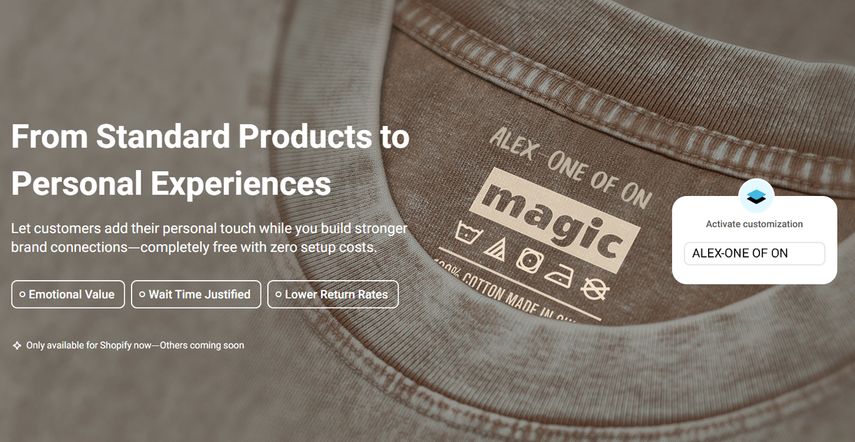
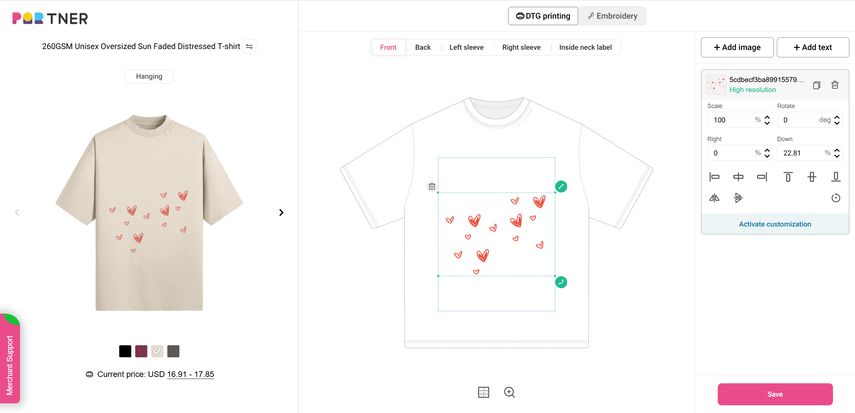
Unlike Printful and Printify, PODpartner's customization feature is built directly into its platform. As a seller, you use PODpartner's design tool to select and activate custom layers when you create a product. Once synced to your Shopify store, every customization order will be automatically sent to PODpartner for production, eliminating the need to confirm orders manually. This integrated approach not only saves you the cost of third-party apps(also refer to customization apps) but also protects your customers' information from potential data leaks. It's a much more convenient solution than what Printful and Printify offer. All 3 custom layers are free.
PODpartner's Personalization Feature
- Supported Products: PODpartner supports all products to activate custom layers
- Layer Limits: You can set up to 3 custom layers per garment for free
- Personalized Areas: Custom layers are not limited to specific zones. Any area that supports DTG printing can have a custom layer, with up to 16 separate regions available. This differs from other platforms like Gelato, where the personalized layer areas are dependent on the apparel type
- Fully Automated: PODpartner's personalization is a built-in feature, so it doesn't rely on third-party apps. All orders and customer personalized elements are fully automatically synced to PODpartner dashboard. This protects your customers' data and prevents potential information leaks
- Platform Support: Currently, automated customization orders on PODpartner are only supported on Shopify
Activate Customization in 3 Steps
1.Activate personalization like text/image zones on the Design Page
2.Save your design and publish it to Shopify
3.After that, your customers can add their own customized elements freely in your store
Pricing Details
PODpartner's Custom Layer tool is free to set up and use, with no monthly fees or charges for personalization feature. You can only pay for the price of the printing areas, which means, custom layer fee is free for your extro printing requirements.
Comparison with Printful/Printify: Unlike Printful's manual approvals or Printify's variable supplier fees, PODpartner's customization layer automates personalized order production, eliminates third-party costs, and ensures secure data handling for a seamless, branded unboxing experience.
Gelato - Personalization Studio
Gelato's personalization feature, known as the Personalization Studio, allows you to add customizable layers for your customers on a selection of products. Its core functionality is similar to PODpartner's: when you upload your design file, you can pre-set which layers are fixed design elements and which are Personalize Layers that customers can edit.
Noticed: Gelato's Personalization Studio would charge extra service fees.
Features of Personalization Studio
- Supported Products: Customization is not available on all products. It is supported on items like adult apparel, tote bags, and phone cases
For example, a beanie can only have one layer, which can be either your own design or a personalization layer. A phone case, on the other hand, can have up to two design layers, which can be either two personalization layers or one of your designs and one personalization layer. It's important to check the specific product page to confirm its customization options before you start
- Layer Limits: Even when adding personalize layers, you are limited to a maximum of three layers in a single print area. For example, if you have one fixed design layer on the front of a shirt, you can only add two personalize layers. Which means, when you already have a branded design, your personalize layers would be reduced
- Restricted Personalization Areas: The areas where you can add a personalization layer are limited and depend on the appeal style
For example, on adult apparel, the specific areas that support a personalization layer are determined by the garment's unique design
- Embroidery: For certain products like baseball caps and beanies, the customization area supports embroidery. However, you are still limited to a single layer for these products, which can be either your own design or a personalize layer
- Supported Platforms: Shopify, Etsy, WooCommerce, Wix & Squarespace, Amazon, TikTok Shop, BigCommerce, and Order Desk & API. If you use a specific platform, you should contact Gelato's customer service for confirmation. Only in Shopify and for Etsy personalize text, Gelato supports fully automatically process in both order data and personalization elements. While in other platforms need manually deals with personalization before production
Restricted personalization areas as shown below: Gelato's personalization feature is up to appeal types.
Pricing Details
Personalization Studio offers three tiers to suit businesses of all sizes:
- Starter: 0 USD/month +6% transaction fee per personalized item ordered
- Regular: 19 USD/month + 4% transaction fee after the 21st personalized item ordered
- Business: Bespoke with our Sales Team
*Transactions calculated from the product's retail price. Minimum transaction fee of $1 per personalized item ordered. The 4-6% transaction fee is a separate charge for using Gelato's automated Personalization Studio software, not for the printing itself. While the cost of printing the first layer is included in the product's base price, the transaction fee is an additional charge that varies based on the subscription plan.
Personalization Apps VS Built-in Features
What is Product personalization App?
A Product personalization App is specifically designed to capture and synchronize the customer's personalization elements (like custom images and text) directly with the order, effectively resolving the issues often encountered when attempting to auto-import this data from standard Shopify orders into POD platforms like Printful and Printify.
However, users must be aware that integrating any third-party app requires granting it access to sensitive order information. These apps, by nature, must collect and process customer data necessary for fulfillment and file generation, including names, addresses, and contact details. This level of access introduces a potential security and privacy risk if the app suffers a data breach.
Examples of Leading Personalization Apps
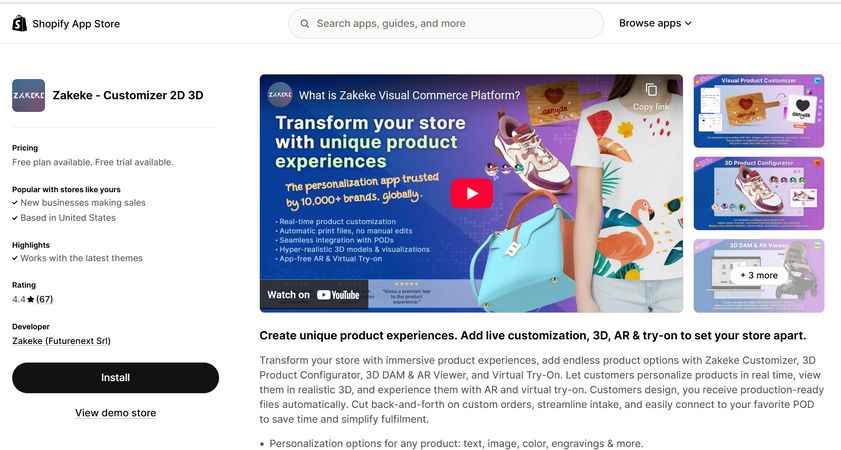
- Zakeke: A comprehensive tool offering 2D, 3D, and even AR real-time previews, giving customers a full, immersive view of their design. It supports a wide range of customization options, including text, images, shapes, and patterns
- Teeinblue POD Personalizer: Built specifically for the POD industry, this app is powerful for personalized gifts and photo-based products. A key highlight is its ability to automatically apply customer-uploaded photos or text directly onto your product templates
- Customily: This app focuses on a highly visual customization experience with an intuitive designer interface. It supports instant previews, allowing customers to create complex personalized products like custom jewelry or greeting cards with ease
- InkyBay - Product Customizer: Offers a robust set of customization tools for complex needs, including multi-area design, vector file uploads, and layer management. It also supports different product variations and dynamic pricing rules
- PickyStory: While primarily a bundling app, it also includes customization features to help merchants create personalized bundled products. It's a great option for sellers who want to package custom items with other products
Noted: These apps provide you with a powerful, automated customization tool, but in exchange, you have to pay for the service. This stands in contrast to the free or low-cost native features offered by some POD platforms.
What are Built-in Personalization Features?
In contrast to third-party apps (personalization Apps), a Built-in Customization Feature is a native tool provided directly by the POD platform.
Taking PODpartner as an example, its personalization is fully automated in synchronization of order data and personalization elements. When you design a product, you can add a Custom Layer directly within PODpartner's design tool. Once you sync this product to your Shopify store, any customer order with personalized elements will be sent directly to PODpartner for production, with no manual steps required. Since there's no third-party app involved, you can avoid extra fees and concerns about data leaks, making it a much more seamless and secure process.
Conclusion
Personalization is now a necessity, not just an option. The available technologies, whether built-in or third-party, offer businesses endless possibilities. However, third-party services come with risks like high costs and potential data exposure. When used wisely, personalization not only boosts profits but also builds strong emotional connections with customers, helping your brand or product stand out in a competitive market.